I saw a post on twitter where someone showcased a reinforcement learning environment for flappybird. The video of the robot slowly learning how to play the game looked super cool to me, so I decided to build my own environment. Since I have literally no experience with reinforcement learning (or machine learning in general) I picked a project very small in scope: teaching an agent to play google’s offline dinosaur game.
This file documents all I learned during my first week of reinforcement learning. I decided to share it in case the information turns out to be useful to other people.
What is reinforcement learning?
Reinforcement learning is a type of machine learning where an intelligent agent is placed inside of an environment and allowed to take multiple actions. These actions are converted into positive and negative reward signals. In order to maximize the reward signal, the agent will either try new actions to gather more knowledge about the environment, or use its existing knowledge to perform the most optimal action.
To put it in really simple terms: reinforcement learning agents learn by trial and error.
The most famous example of reinforcement learning is probably Google’s “AlphaGo”. AlphaGo was a computer program created by DeepMind to play the board game Go. It used a search algorithm to find its moves based on knowledge acquired from both human and computer play. In 2016, it was able to beat the second-best human player in the world (Lee Sedol).
Why Pufferlib?
I picked Pufferlib to create my environment because I have been seeing people talk about this library on twitter a lot. Maybe I should have done more research on reinforcement learning libraries, but I didn’t feel like it. The creator of Pufferlib, Joseph Suarez, seems like a smart and motivated guy, so I enjoy contributing to his project.
If you want to learn about Pufferlib, I checkout the official docs. I also recommend checking out Joseph’s Phd thesis defense on youtube (it’s really cool!).
Setting up Pufferlib
The first step to working with Pufferlib is to set up a dev environment. I would say the process is pretty easy. This is a step-by-step guide I wrote for future reference:
- Install dependencies: CUDA, Python, UV and WSL (if using a windows machine)
- Fork Pufferlib’s repository and clone the fork locally
- Set up the UV environment with
[uv venv],[uv pip install -e]and[source .venv/bin/activate] - Run
[puffer eval puffer_squared]to ensure the set up was successfull.
I also wrote some notes on setting up a new custom environment.
- Copy one of the template environments in the “ocean” directory (squared or target) and rename all relevant files/variables.
- Modify “pufferlib/ocean/environment.py” to include your new environment.
- Add a new .ini file in pufferlib/config/ocean
- Run
[bash scripts/build_ocean.sh]to build your .c and .h files for testing. - Run
[python setup.py build_ext --inplace --force]"to build all environments. - Run
[puffer train/eval env_name]to train/eval your environment.
How does a Pufferlib environment work?
A Pufferlib environment has 4 main files: env.c, env.h, bindings.c and env.py. I’ll try to explain what each file does, and how they all come together to create a pufferlib environment.
Env.h
The env.h file is where the core logic of an environment stays. It’s where rewards, observations and rendering logic are defined. A Pufferlib environment will typically define a set of mandatory and non-mandatory structs and functions. In this context “mandatory” means that a specific struct or method must exist, or else the environment will not work property.
Structs
The Log structure (mandatory) is used to log the data of each run during a training session. It’s important for this data to be formatted properly.
// Required struct. Only use floats!
typedef struct {
    float perf; // 0-1 normalized single real number perf metric
    float score; // unnormalized single real number perf metric
    float episode_return; // sum of agent rewards over episode
    float episode_length; // number of steps of agent episode
    // extra (non-mandatory) fields...
    float n; // Required as last field
} Log;
The Env structure (mandatory) is used to store all the data for an environment. It’s equivalent to the “game state” variable in a videogame.
typedef struct {
    /* Mandatory variables */
    Log log; // Env binding code uses this to aggregate logs
    float* observations; // Used for storing environment observations
    int* actions; // Used for storing player/agent input
    float* rewards; // Used to store agent rewards
    unsigned char* terminals; // Used for specifying when an episode ends
    /* Non-mandatory variables (example) */
    Client* client;
    Agent* agent;
    Obstacle* obstacles;
    int num_obstacles;
    int speed;
    int width;
    int height;
} Env;
The Agent structure (non-mandatory) is used to store data about the agent.
typedef struct {
    int ticks;
    float x;
    float y;
} Agent;
The Client structure (non-mandatory) is used to store texture data.
typedef struct {
    Texture2D agent_sprite;
    Texture2D obstacle_sprite;
} Client;
Functions
The init (non-mandatory) function runs once at the start of a training session.
void init(Env* env) {
    env->agent = calloc(1, sizeof(Agent));
    env->agent->width = PLAYER_WIDTH;
    env->agent->height = PLAYER_HEIGHT;
}
The c_reset (mandatory) function runs at the start of each run in a training session. It’s used to reset variables before a new run begins.
void c_reset(Env* env){
    env->spawn_ticks = 0;
    env->agent->x = 10;
    env->agent->y = 0;

    env->num_obstacles = 0;
    if (env->obstacles != NULL) {
          free(env->obstacles);
          env->obstacles = NULL;
    }

    // compute env observations on reset
    compute_observations(env);
}
The c_step (mandatory) function runs once for every step of a training session. It functions just like the “on tick” or “update” functions used for game development.
void c_step(Env* env){
    env->agent->ticks += 1;
    // rewards and terminals must be set every frame
    *env->rewards = 0.01f; // positive reward for surviving another frame
    *env->terminals = 0; // dont terminate episode

    // main environment logic (input handling, movement, ...)

    // compute env observations every frame
    compute_observations(env);
}
The c_render (mandatory) function is used to render graphics to the screen. It’s not used during training runs, only during evals or manual testing.
void c_render(Env* env){
    if(env->client == NULL) {
        env->client = make_client(env);
    }

    // close environment when ESC is pressed (pufferlib standard)
    if(IsKeyDown(KEY_ESCAPE)) {
        exit(0);
    }

    // draw player, objects, background, etc
}
The c_close (mandatory) function runs at the end of a training session. It’s mostly used to free up allocated memory.
void c_close(Env* env){
    free(env->agent);
    if(env->client != NULL){
        UnloadTexture(env->client->agent_sprite);
        UnloadTexture(env->client->obstacle_sprite);
        CloseWindow();
        free(env->client);
    }
}
The make_client (non-mandatory) function is used to set up the graphics pipeline. It creates a window and loads the textures used during rendering. It’s called at the start of c_render.
Client* make_client(Env* env){
    Client* client = (Client*)calloc(1, sizeof(Client));

    InitWindow(env->width, env->height, "Pufferlib Environment");
    SetTargetFPS(60);

    client->agent_sprite = LoadTexture("resources/my_env/agent.png");
    client->obstacle_sprite = LoadTexture("resources/my_env/obstacle.png");
    return client;
}
The compute_observations (non-mandatory) function is called by c_render and c_reset. It performs an “observation” on the environment, and sends that data to the agent. The agent uses the information given from these observations to calculate which actions to take, so it’s important to send all “important” environment data in these observations. It’s important that these observations are properly formatted (normalized to -1, 1).
void compute_observations(Env* env) {
    int obs_idx = 0;
    // send player data (position, speed, hp, etc...)
    env->observations[obs_idx++] = env->agent->y / env->height;
    env->observations[obs_idx++] = env->agent->x/env->width;

    // send other relevant data
    // ex: obstacle positions, time spent, current score
    for(int o = 0; o < env->max_obstacles; o++){
        if (o < env->num_obstacles) {
            Obstacle* obstacle = &env->obstacles[o];
            env->observations[obs_idx++] = obstacle->x/env->width;
            env->observations[obs_idx++] = obstacle->y/env->height;
        } else {
            env->observations[obs_idx++] = 1.0f;
            env->observations[obs_idx++] = 1.0f;
        }
    }
}
Env.c
The env.c file is used to test our environment. Below’s the code for the .c file of my first environment (with comments to explain the logic!).
int main() {
    // Load a neural net to play our game
    // The .bin file can be generated by running puffer export env_name
    Weights* weights =
    load_weights("resources/dinosaur/puffer_dinosaur_weights.bin", 545296);

    int logit_sizes[1] = {3};
    int num_obs = (max_obstacles*3) + 4;
    LinearLSTM* net = make_linearlstm(weights, 1, num_obs, logit_sizes, 1);

    // Init environment variable
    Dinosaur env = {
        .width = 800,
        .height = 400,
        .speed_init = 6,
        .speed_max = 14,
        .spawn_rate_max = 65,
        .spawn_rate_min = 45,
        .rate_increment_rate = 600,
        .max_obstacles = 8,
    };
    env.client = make_client(&env);
    init(&env);

    // Allocate memory for these variables
    env.observations = calloc(num_obs, sizeof(float));
    env.actions = calloc(2, sizeof(int));
    env.rewards = calloc(1, sizeof(float));
    env.terminals = calloc(1, sizeof(unsigned char));

    // Init game loop
    c_reset(&env);
    c_render(&env);
    while (!WindowShouldClose()) {
        if(IsKeyDown(KEY_LEFT_SHIFT)){
      // Player controls character
            env.actions[0] = NOOP;
            if(IsKeyDown(KEY_UP)) env.actions[0] = JUMP;
            if(IsKeyDown(KEY_DOWN)) env.actions[0] = CROUCH;
        } else {
          // Neural network controls character
            int* actions = (int*)env.actions;
            forward_linearlstm(net, env.observations, actions);
            env.actions[0] = actions[0];
        }
        c_step(&env);
        c_render(&env);
    }

    // Free allocated memory
    free_linearlstm(net);
    free(weights);
    free(env.observations);
    free(env.actions);
    free(env.rewards);
    free(env.terminals);
    c_close(&env);
}
Env.py
The python file of an enviroment is used to wrap the c environment and provide a Gymnasium api. It creates an environment class which inherits Pufferlib’s default class for environments, handles observations and actions and manages the configuration and initialization of the environment. While the the .h file varies a lot between different environments, it seems, based on my research, that the python file stays mostly the same. Below you can see the code for “Squared”, one of Pufferlib’s two template environment.
'''A simple sample environment. Use this as a template for your own envs.'''

import gymnasium
import numpy as np

import pufferlib
from pufferlib.ocean.squared import binding

class Squared(pufferlib.PufferEnv):
    # initalize environment
    def __init__(self, num_envs=1, render_mode=None,
                 log_interval=128, size=11, buf=None, seed=0):

        self.single_observation_space = gymnasium.spaces.Box(
            low=0,
            high=1,
            shape=(size*size,),
            dtype=np.uint8
        )
        self.single_action_space = gymnasium.spaces.Discrete(5)
        self.render_mode = render_mode
        self.num_agents = num_envs
        self.log_interval = log_interval

        super().__init__(buf)
        self.c_envs = binding.vec_init(
            self.observations,
            self.actions,
            self.rewards,
            self.terminals,
            self.truncations,
            num_envs,
            seed,
            size=size
        )

    # reset environment
    def reset(self, seed=0):
        binding.vec_reset(self.c_envs, seed)
        self.tick = 0
        return self.observations, []

    # update environment every frame
    def step(self, actions):
        self.tick += 1

        self.actions[:] = actions
        binding.vec_step(self.c_envs)

        info = []
        if self.tick % self.log_interval == 0:
            info.append(binding.vec_log(self.c_envs))

        return (self.observations, self.rewards,
            self.terminals, self.truncations, info)

    # render environment
    def render(self):
        binding.vec_render(self.c_envs, 0)

    # close environment
    def close(self):
        binding.vec_close(self.c_envs)

if __name__ == '__main__':
    N = 4096

    env = Squared(num_envs=N)
    env.reset()
    steps = 0

    CACHE = 1024
    actions = np.random.randint(0, 5, (CACHE, N))

    i = 0
    import time
    start = time.time()
    while time.time() - start < 10:
        env.step(actions[i % CACHE])
        steps += N
        i += 1

    print('Squared SPS:', int(steps / (time.time() - start)))
Bindings.c
The bindings.c file is basically the glue connecting the environment logic, defined in the c files, with the higher-level api being used in the python file. Here’s the bindings.c file for the “Squared” environment.
#include "squared.h"

#define Env Squared
#include "../env_binding.h"

// Python -> C
static int my_init(Env* env, PyObject* args, PyObject* kwargs) {
    env->size = unpack(kwargs, "size");
    return 0;
}

// C -> Python
static int my_log(PyObject* dict, Log* log) {
    assign_to_dict(dict, "perf", log->perf);
    assign_to_dict(dict, "score", log->score);
    assign_to_dict(dict, "episode_return", log->episode_return);
    assign_to_dict(dict, "episode_length", log->episode_length);
    return 0;
}
My first environment
Like I already said, I wanted my first reinforcement learning environment to be something extremely simple. It took my about 2 days to create a clone of google’s dinosaur game, and about 5 days to add the observations/rewards/terminations/etc. This could absolutely be done much faster, I only spent like 1-2 hours per-day on this project.
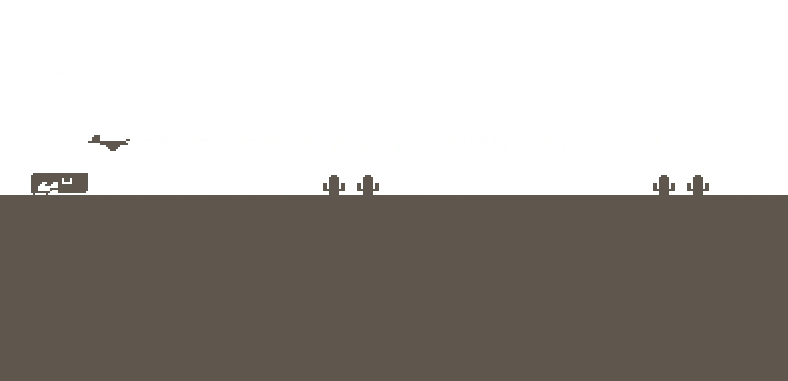
If you want to try my environment locally, here’s the link to my PR. Here’s a screenshot of it:
Some things I learned while writing this environment that haven’t been mentioned yet:
- Formatting your logs and observations correctly is REALLY important. My environment didn’t work at all until I normalized my observations to values between -1 and 1.
- The Pufferlib discord has a really cool community. People are always ready to help newbies get started.
- If an environment is producing “good” results after 40 million training steps, it seems to be a good idea to increase the number of steps to at least 100 million and see how much the model improves just by scaling its training run.
Future environments
Now I’m more comfortable with reinforcement learning, I have a list of environments that I want to build. I plan to build them in increasing order of complexity.
- A single-agent environment for vampire survivors.
- A multi-agent environment for a capture that flag top-down shooter game.
- A multi-agent environment where multiple agents collaborate to achieve a specific goal (this idea is still very rough, I haven’t thought of a good game for this yet).
Final thoughts
I think the internet and the way it democratizes education is pretty cool. I went from knowing nothing about reinforcement learning to knowing some things about reinforcement learning in about a week, that’s so awesome!
I think that anyone who enjoys programming games should try to create a simple reinforcement learning environment at least once. You just need to program a simple game (flappybird, 2048, tic-tac-toe, etc) and then add rewards and observations! Seeing a tiny robot you learn to master a game in just 2-3 minutes of training is really cool. The future is awesome.
I hope this document was useful or, at the very least, entertaining to whoever read it. Thank you for your time!